To support local development and usage of crossplane compositions, a crossplane provider is needed. Every big hyperscaler already has support in crossplane (e.g. provider-gcp and provider-aws).
Each provider has two main parts, the provider config and implementations of the cloud resources.
The provider config takes the credentials to log into the cloud provider and provides a token (e.g. a kube config or even a service account) that the implementations can use to provision cloud resources.
The implementations of the cloud resources reflect each type of cloud resource, typical resources are:
- S3 Bucket
- Nodepool
- VPC
- GkeCluster
Architecture of provider-kind
To have the crossplane concepts applied, the provider-kind consists of two components: kindserver and provider-kind.
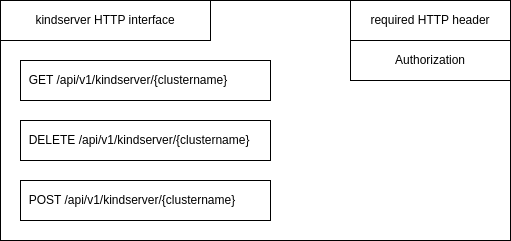
The kindserver is used to manage local kind clusters. It provides an HTTP REST interface to create, delete and get informations of a running cluster, using an Authorization HTTP header field used as a password:
The two properties to connect the provider-kind to kindserver are the IP address and password of kindserver. The IP address is required because the kindserver needs to be executed outside the kind cluster, directly on the local machine, as it need to control kind itself:
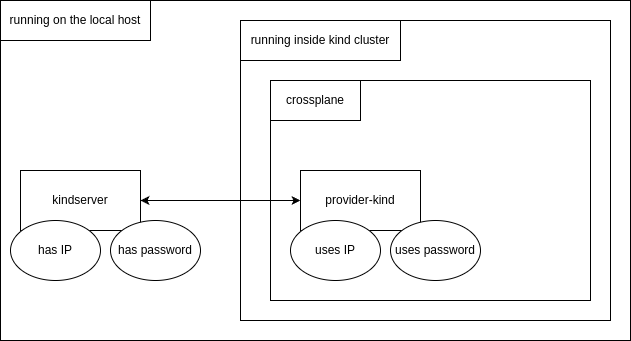
The provider-kind provides two crossplane elements, the ProviderConfig and KindCluster as the (only) cloud resource. The
ProviderConfig is configured with the IP address and password of the running kindserver. The KindCluster type is configured
to use the provided ProviderConfig. Kind clusters can be managed by adding and removing kubernetes manifests of type
KindCluster. The crossplane reconcilation loop makes use of the kindserver HTTP GET method to see if a new cluster needs to be
created by HTTP POST or being removed by HTTP DELETE.
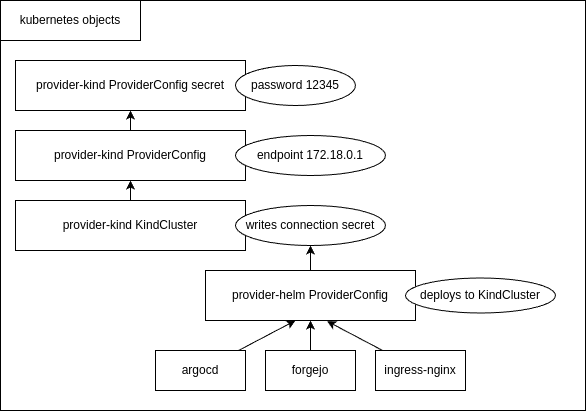
The password used by ProviderConfig is configured as an kubernetes secret, while the kindserver IP address is configured
inside the ProviderConfig as the field endpoint.
When provider-kind created a new cluster by processing a KindCluster manifest, the two providers which are used to deploy applications, provider-helm and provider-kubernetes, can be configured to use the KindCluster.
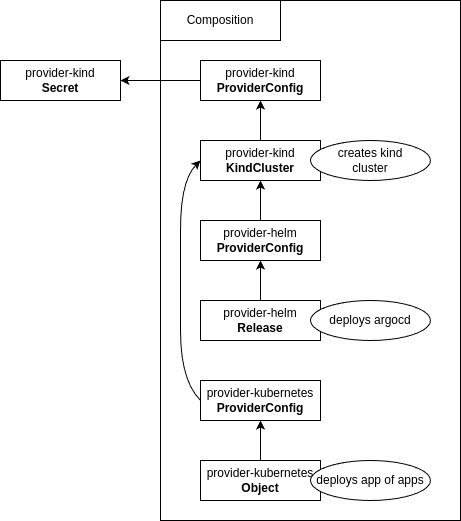
A Crossplane composition can be created by concaternating different providers and their objects. A composition is managed as a custom resource definition and defined in a single file.
Configuration
Two kubernetes manifests are defines by provider-kind: ProviderConfig and KindCluster. The third needed kubernetes
object is a secret.
The need for the following inputs arise when developing a provider-kind:
- kindserver password as a kubernetes secret
- endpoint, the IP address of the kindserver as a detail of
ProviderConfig - kindConfig, the kind configuration file as a detail of
KindCluster
The following outputs arise:
- kubernetesVersion, kubernetes version of a created kind cluster as a detail of
KindCluster - internalIP, IP address of a created kind cluster as a detail of
KindCluster - readiness as a detail of
KindCluster - kube config of a created kind cluster as a kubernetes secret reference of
KindCluster
Inputs
kindserver password
The kindserver password needs to be defined first. It is realized as a kubernetes secret and contains the password which the kindserver has been configured with:
apiVersion: v1
data:
  credentials: MTIzNDU=
kind: Secret
metadata:
  name: kind-provider-secret
  namespace: crossplane-system
type: Opaque
endpoint
The IP address of the kindserver endpoint is configured in the provider-kind ProviderConfig. This config also references the kindserver password (kind-provider-secret):
apiVersion: kind.crossplane.io/v1alpha1
kind: ProviderConfig
metadata:
  name: kind-provider-config
spec:
  credentials:
    source: Secret
    secretRef:
      namespace: crossplane-system
      name: kind-provider-secret
      key: credentials
  endpoint:
    url: https://172.18.0.1:7443/api/v1/kindserver
It is suggested that the kindserver runs on the IP of the docker host, so that all kind clusters can access it without extra routing.
kindConfig
The kind config is provided as the field kindConfig in each KindCluster manifest. The manifest also references the provider-kind ProviderConfig (kind-provider-config in the providerConfigRef field):
apiVersion: container.kind.crossplane.io/v1alpha1
kind: KindCluster
metadata:
	name: example-kind-cluster
spec:
	forProvider:
	kindConfig: |
		kind: Cluster
		apiVersion: kind.x-k8s.io/v1alpha4
		nodes:
		- role: control-plane
		kubeadmConfigPatches:
		- |
			kind: InitConfiguration
			nodeRegistration:
			kubeletExtraArgs:
				node-labels: "ingress-ready=true"
		extraPortMappings:
		- containerPort: 80
			hostPort: 80
			protocol: TCP
		- containerPort: 443
			hostPort: 443
			protocol: TCP
		containerdConfigPatches:
		- |-
		[plugins."io.containerd.grpc.v1.cri".registry.mirrors."gitea.cnoe.localtest.me:443"]
			endpoint = ["https://gitea.cnoe.localtest.me"]
		[plugins."io.containerd.grpc.v1.cri".registry.configs."gitea.cnoe.localtest.me".tls]
			insecure_skip_verify = true
	providerConfigRef:
		name: kind-provider-config
	writeConnectionSecretToRef:
		namespace: default
		name: kind-connection-secret
After the kind cluster has been created, it’s kube config is stored in a kubernetes secret kind-connection-secret which writeConnectionSecretToRef references.
Outputs
The three outputs can be recieved by getting the KindCluster manifest after the cluster has been created. The KindCluster is
available for reading even before the cluster has been created, but the three outputfields are empty until then. The ready state
will also switch from false to true after the cluster has finally been created.
kubernetesVersion, internalIP and readiness
This fields can be recieved with a standard kubectl get command:
$ kubectl get kindclusters kindcluster-fw252 -o yaml
...
status:
  atProvider:
    internalIP: 192.168.199.19
    kubernetesVersion: v1.31.0
  conditions:
  - lastTransitionTime: "2024-11-12T18:22:39Z"
    reason: Available
    status: "True"
    type: Ready
  - lastTransitionTime: "2024-11-12T18:21:38Z"
    reason: ReconcileSuccess
    status: "True"
    type: Synced
kube config
The kube config is stored in a kubernetes secret (kind-connection-secret) which can be accessed after the cluster has been
created:
$ kubectl get kindclusters kindcluster-fw252 -o yaml
...
  writeConnectionSecretToRef:
    name: kind-connection-secret
    namespace: default
...

$ kubectl get secret kind-connection-secret
NAME                     TYPE                                DATA   AGE
kind-connection-secret   connection.crossplane.io/v1alpha1   2      107m
The API endpoint of the new cluster endpoint and it’s kube config kubeconfig is stored in that secret. This values are set in
the Obbserve function of the kind controller of provider-kind. They are set with the special crossplane function managed
ExternalObservation.
The reconciler loop of a crossplane provider
The reconciler loop is the heart of every crossplane provider. As it is coupled async, it’s best to describe it working in words:
Internally, the Connect function get’s triggered in the kindcluster controller internal/controller/kindcluster/kindcluster.go
first, to setup the provider and configure it with the kindserver password and IP address of the kindserver.
After that the provider-kind has been configured with the kindserver secret and it’s ProviderConfig, the provider is ready to
be activated by applying a KindCluster manifest to kubernetes.
When the user applies a new KindCluster manifest, a observe loop is started. The provider regulary triggers the Observe
function of the controller. As there has yet been created nothing yet, the controller will return
managed.ExternalObservation{ResourceExists: false} to signal that the kind cluster resource has not been created yet.
As the is a kindserver SDK available, the controller is using the Get function of the SDK to query the kindserver.
The KindCluster is already applied and can be retrieved with kubectl get kindclusters. As the cluster has not been
created yet, it readiness state is false.
In parallel, the Create function is triggered in the controller. This function has acces to the desired kind config
cr.Spec.ForProvider.KindConfig and the name of the kind cluster cr.ObjectMeta.Name. It can now call the kindserver SDK to
create a new cluster with the given config and name. The create function is supposed not to run too long, therefore
it directly returns in the case of provider-kind. The kindserver already knows the name of the new cluster and even it is
not yet ready, it will respond with a partial success.
The observe loops is triggered regulary in parallel. It will be triggered after the create call but before the kind cluster has been created. Now it will get a step further. It gets the information of kindserver, that the cluster is already knows, but not finished creating yet.
After the cluster has been finished creating, the kindserver has all important informations for the provider-kind. That is The API server endpoint of the new cluster and it’s kube config. After another round of the observer loop, the controller gets now the full set of information of kindcluster (cluster ready, it’s API server endpoint and it’s kube config). When this informations has been recieved by the kindserver SDk in form of a JSON file, it is able to signal successfull creating of the cluster. That is done by returning the following structure from inside the observe function:
	return managed.ExternalObservation{
		ResourceExists:   true,
		ResourceUpToDate: true,
		ConnectionDetails: managed.ConnectionDetails{
			xpv1.ResourceCredentialsSecretEndpointKey:   []byte(clusterInfo.Endpoint),
			xpv1.ResourceCredentialsSecretKubeconfigKey: []byte(clusterInfo.KubeConfig),
		},
	}, nil
Note that the managed.ConnectionDetails will automatically write the API server endpoint and it’s kube config to the kubernetes
secret which writeConnectionSecretToRefof KindCluster points to.
It also set the availability flag before returning, that will mark the KindCluster as ready:
cr.Status.SetConditions(xpv1.Available())
Before returning, it will also set the informations which are transfered into fields of kindCluster which can be retrieved by a
kubectl get, the kubernetesVersion and the internalIP fields:
	cr.Status.AtProvider.KubernetesVersion = clusterInfo.K8sVersion
	cr.Status.AtProvider.InternalIP = clusterInfo.NodeIp
Now the KindCluster is setup completly and when it’s data is retrieved by kubectl get, all data is available and it’s readiness
is set to true.
The observer loops continies to be called to enable drift detection. That detection is currently not implemented, but is
prepared for future implementations. When the observer function would detect that the kind cluster with a given name is set
up with a kind config other then the desired, the controller would call the controller Update function, which would
delete the currently runnign kind cluster and recreates it with the desired kind config.
When the user is deleting the KindCluster manifest at a later stage, the Delete function of the controller is triggered
to call the kindserver SDK to delete the cluster with the given name. The observer loop will acknowledge that the cluster
is deleted successfully by retrieving kind cluster not found when the deletion had been successfull. If not, the controller
will trigger the delete function in a loop as well, until the kind cluster has been deleted.
That assembles the reconciler loop.
kind API server IP address
Each newly created kind cluster has a practially random kubernetes API server endpoint. As the IP address of a new kind cluster can’t determined before creation, the kindserver manages the API server field of the kind config. It will map all kind server kubernets API endpoints on it’s own IP address, but on different ports. That garantees that alls kind clusters can access the kubernetes API endpoints of all other kind clusters by using the docker host IP of the kindserver itself. This is needed as the kube config hardcodes the kubernets API server endpoint. By using the docker host IP but with different ports, every usage of a kube config from one kind cluster to another is working successfully.
The management of the kind config in the kindserver is implemented in the Post function of the kindserver main.go file.
Create a the crossplane provider-kind
The official way for creating crossplane providers is to use the provider-template. Process the following steps to create a new provider.
First, clone the provider-template. The commit ID when this howto has been written is 2e0b022c22eb50a8f32de2e09e832f17161d7596. Rename the new folder after cloning.
git clone https://github.com/crossplane/provider-template.git
mv provider-template provider-kind
cd provider-kind/
The informations in the provided README.md are incomplete. Folow this steps to get it running:
Please use bash for the next commands (
${type,,}e.g. is not a mistake)
make submodules
export provider_name=Kind # Camel case, e.g. GitHub
make provider.prepare provider=${provider_name}
export group=container # lower case e.g. core, cache, database, storage, etc.
export type=KindCluster # Camel casee.g. Bucket, Database, CacheCluster, etc.
make provider.addtype provider=${provider_name} group=${group} kind=${type}
sed -i "s/sample/${group}/g" apis/${provider_name,,}.go
sed -i "s/mytype/${type,,}/g" internal/controller/${provider_name,,}.go
Patch the Makefile:
dev: $(KIND) $(KUBECTL)
 	@$(INFO) Creating kind cluster
+	@$(KIND) delete cluster --name=$(PROJECT_NAME)-dev
 	@$(KIND) create cluster --name=$(PROJECT_NAME)-dev
 	@$(KUBECTL) cluster-info --context kind-$(PROJECT_NAME)-dev
-	@$(INFO) Installing Crossplane CRDs
-	@$(KUBECTL) apply --server-side -k https://github.com/crossplane/crossplane//cluster?ref=master
+	@$(INFO) Installing Crossplane
+	@helm install crossplane --namespace crossplane-system --create-namespace crossplane-stable/crossplane --wait
 	@$(INFO) Installing Provider Template CRDs
 	@$(KUBECTL) apply -R -f package/crds
 	@$(INFO) Starting Provider Template controllers
Generate, build and execute the new provider-kind:
make generate
make build
make dev
Now it’s time to add the required fields (internalIP, endpoint, etc.) to the spec fields in go api sources found in:
- apis/container/v1alpha1/kindcluster_types.go
- apis/v1alpha1/providerconfig_types.go
The file apis/kind.go may also be modified. The word sample can be replaces with container in our case.
When that’s done, the yaml specifications needs to be modified to also include the required fields (internalIP, endpoint, etc.)
Next, a kindserver SDK can be implemented. That is a helper class which encapsulates the get, create and delete HTTP calls to the kindserver. Connection infos (kindserver IP address and password) will be stored by the constructor.
After that we can add the usage of the kindclient sdk in kindcluster controller internal/controller/kindcluster/kindcluster.go.
Finally we can update the Makefile to better handle the primary kind cluster creation and adding of a cluster role binding
so that crossplane can access the KindCluster objects. Examples and updating the README.md will finish the development.
All this steps are documented in: https://forgejo.edf-bootstrap.cx.fg1.ffm.osc.live/DevFW/provider-kind/pulls/1
Publish the provider-kind to a user defined docker registry
Every provider-kind release needs to be tagged first in the git repository:
git tag v0.1.0
git push origin v0.1.0
Next, make sure you have docker logged in into the target registry:
docker login forgejo.edf-bootstrap.cx.fg1.ffm.osc.live
Now it’s time to specify the target registry, build the provider-kind for ARM64 and AMD64 CPU architectures and publish it to the target registry:
XPKG_REG_ORGS_NO_PROMOTE="" XPKG_REG_ORGS="forgejo.edf-bootstrap.cx.fg1.ffm.osc.live/richardrobertreitz" make build.all publish BRANCH_NAME=main
The parameter BRANCH_NAME=main is needed when the tagging and publishing happens from another branch. The version of the provider-kind that of the tag name. The output of the make call ends then like this:
$ XPKG_REG_ORGS_NO_PROMOTE="" XPKG_REG_ORGS="forgejo.edf-bootstrap.cx.fg1.ffm.osc.live/richardrobertreitz" make build.all publish BRANCH_NAME=main
...
14:09:19 [ .. ] Skipping image publish for docker.io/provider-kind:v0.1.0
Publish is deferred to xpkg machinery
14:09:19 [ OK ] Image publish skipped for docker.io/provider-kind:v0.1.0
14:09:19 [ .. ] Pushing package forgejo.edf-bootstrap.cx.fg1.ffm.osc.live/richardrobertreitz/provider-kind:v0.1.0
xpkg pushed to forgejo.edf-bootstrap.cx.fg1.ffm.osc.live/richardrobertreitz/provider-kind:v0.1.0
14:10:19 [ OK ] Pushed package forgejo.edf-bootstrap.cx.fg1.ffm.osc.live/richardrobertreitz/provider-kind:v0.1.0
After publishing, the provider-kind can be installed in-cluster similar to other providers like provider-helm and provider-kubernetes. To install it apply the following manifest:
apiVersion: pkg.crossplane.io/v1
kind: Provider
metadata:
  name: provider-kind
spec:
  package: forgejo.edf-bootstrap.cx.fg1.ffm.osc.live/richardrobertreitz/provider-kind:v0.1.0
The output of kubectl get providers:
$ kubectl get providers
NAME                  INSTALLED   HEALTHY   PACKAGE                                                                             AGE
provider-helm         True        True      xpkg.upbound.io/crossplane-contrib/provider-helm:v0.19.0                            38m
provider-kind         True        True      forgejo.edf-bootstrap.cx.fg1.ffm.osc.live/richardrobertreitz/provider-kind:v0.1.0   39m
provider-kubernetes   True        True      xpkg.upbound.io/crossplane-contrib/provider-kubernetes:v0.15.0                      38m
The provider-kind can now be used.
Crossplane Composition edfbuilder
Together with the implemented provider-kind and it’s config to create a composition which can create kind clusters and the ability to deploy helm and kubernetes objects in the newly created cluster.
A composition is realized as a custom resource definition (CRD) considting of three parts:
- A definition
- A composition
- One or more deplyoments of the composition
definition.yaml
The definition of the CRD will most probably contain one additional fiel, the ArgoCD repository URL to easily select the stacks which should be deployed:
apiVersion: apiextensions.crossplane.io/v1
kind: CompositeResourceDefinition
metadata:
  name: edfbuilders.edfbuilder.crossplane.io
spec:
  connectionSecretKeys:
    - kubeconfig
  group: edfbuilder.crossplane.io
  names:
    kind: EDFBuilder
    listKind: EDFBuilderList
    plural: edfbuilders
    singular: edfbuilders
  versions:
    - name: v1alpha1
      served: true
      referenceable: true
      schema:
        openAPIV3Schema:
          description: A EDFBuilder is a composite resource that represents a K8S Cluster with edfbuilder Installed
          type: object
          properties:
            spec:
              type: object
              properties:
                repoURL:
                  type: string
                  description: URL to ArgoCD stack of stacks repo
              required:
                - repoURL
composition.yaml
This is a shortened version of the file examples/composition_deprecated/composition.yaml. It combines a KindCluster with
deployments of of provider-helm and provider-kubernetes. Note that the ProviderConfig and the kindserver secret has already been
applied to kubernetes (by the Makefile) before applying this composition.
apiVersion: apiextensions.crossplane.io/v1
kind: Composition
metadata:
  name: edfbuilders.edfbuilder.crossplane.io
spec:
  writeConnectionSecretsToNamespace: crossplane-system
  compositeTypeRef:
    apiVersion: edfbuilder.crossplane.io/v1alpha1
    kind: EDFBuilder
  resources:

    ### kindcluster
    - base:
        apiVersion: container.kind.crossplane.io/v1alpha1
        kind: KindCluster
        metadata:
          name: example
        spec:
          forProvider:
            kindConfig: |
              kind: Cluster
              apiVersion: kind.x-k8s.io/v1alpha4
              nodes:
              - role: control-plane
                kubeadmConfigPatches:
                - |
                  kind: InitConfiguration
                  nodeRegistration:
                    kubeletExtraArgs:
                      node-labels: "ingress-ready=true"
                extraPortMappings:
                - containerPort: 80
                  hostPort: 80
                  protocol: TCP
                - containerPort: 443
                  hostPort: 443
                  protocol: TCP
              containerdConfigPatches:
              - |-
                [plugins."io.containerd.grpc.v1.cri".registry.mirrors."gitea.cnoe.localtest.me:443"]
                  endpoint = ["https://gitea.cnoe.localtest.me"]
                [plugins."io.containerd.grpc.v1.cri".registry.configs."gitea.cnoe.localtest.me".tls]
                  insecure_skip_verify = true
          providerConfigRef:
            name: example-provider-config
          writeConnectionSecretToRef:
            namespace: default
            name: my-connection-secret

    ### helm provider config
    - base:
        apiVersion: helm.crossplane.io/v1beta1
        kind: ProviderConfig
        spec:
          credentials:
            source: Secret
            secretRef:
              namespace: default
              name: my-connection-secret
              key: kubeconfig
      patches:
        - fromFieldPath: metadata.name
          toFieldPath: metadata.name
      readinessChecks:
        - type: None

    ### ingress-nginx
    - base:
        apiVersion: helm.crossplane.io/v1beta1
        kind: Release
        metadata:
          annotations:
            crossplane.io/external-name: ingress-nginx
        spec:
          rollbackLimit: 99999
          forProvider:
            chart:
              name: ingress-nginx
              repository: https://kubernetes.github.io/ingress-nginx
              version: 4.11.3
            namespace: ingress-nginx
            values:
              controller:
                updateStrategy:
                  type: RollingUpdate
                  rollingUpdate:
                    maxUnavailable: 1
                hostPort:
                  enabled: true
                terminationGracePeriodSeconds: 0
                service:
                  type: NodePort
                watchIngressWithoutClass: true

                nodeSelector:
                  ingress-ready: "true"
                tolerations:
                  - key: "node-role.kubernetes.io/master"
                    operator: "Equal"
                    effect: "NoSchedule"
                  - key: "node-role.kubernetes.io/control-plane"
                    operator: "Equal"
                    effect: "NoSchedule"

                publishService:
                  enabled: false
                extraArgs:
                  publish-status-address: localhost
                  # added for idpbuilder
                  enable-ssl-passthrough: ""

                # added for idpbuilder
                allowSnippetAnnotations: true

                # added for idpbuilder
                config:
                  proxy-buffer-size: 32k
                  use-forwarded-headers: "true"
      patches:
        - fromFieldPath: metadata.name
          toFieldPath: spec.providerConfigRef.name

    ### kubernetes provider config
    - base:
        apiVersion: kubernetes.crossplane.io/v1alpha1
        kind: ProviderConfig
        spec:
          credentials:
            source: Secret
            secretRef:
              namespace: default
              name: my-connection-secret
              key: kubeconfig
      patches:
        - fromFieldPath: metadata.name
          toFieldPath: metadata.name
      readinessChecks:
        - type: None

    ### kubernetes argocd stack of stacks application
    - base:
        apiVersion: kubernetes.crossplane.io/v1alpha2
        kind: Object
        spec:
          forProvider:
            manifest:
              apiVersion: argoproj.io/v1alpha1
              kind: Application
              metadata:
                name: edfbuilder
                namespace: argocd
                labels:
                  env: dev
              spec:
                destination:
                  name: in-cluster
                  namespace: argocd
                source:
                  path: registry
                  repoURL: 'https://gitea.cnoe.localtest.me/giteaAdmin/edfbuilder-shoot'
                  targetRevision: HEAD
                project: default
                syncPolicy:
                  automated:
                    prune: true
                    selfHeal: true
                  syncOptions:
                    - CreateNamespace=true
      patches:
        - fromFieldPath: metadata.name
          toFieldPath: spec.providerConfigRef.name
Usage
Set this values to allow many kind clusters running in parallel, if needed:
sudo sysctl fs.inotify.max_user_watches=524288
sudo sysctl fs.inotify.max_user_instances=512

To make the changes persistent, edit the file /etc/sysctl.conf and add these lines:
fs.inotify.max_user_watches = 524288
fs.inotify.max_user_instances = 512
Start provider-kind:
make build
kind delete clusters $(kind get clusters)
kind create cluster --name=provider-kind-dev
DOCKER_HOST_IP="$(docker inspect $(docker ps | grep kindest | awk '{ print $1 }' | head -n1) | jq -r .[0].NetworkSettings.Networks.kind.Gateway)" make dev
Wait until debug output of the provider-kind is shown:
...
namespace/crossplane-system configured
secret/example-provider-secret created
providerconfig.kind.crossplane.io/example-provider-config created
14:49:50 [ .. ] Starting Provider Kind controllers
2024-11-12T14:49:54+01:00	INFO	controller-runtime.metrics	Starting metrics server
2024-11-12T14:49:54+01:00	INFO	Starting EventSource	{"controller": "providerconfig/providerconfig.kind.crossplane.io", "controllerGroup": "kind.crossplane.io", "controllerKind": "ProviderConfig", "source": "kind source: *v1alpha1.ProviderConfig"}
2024-11-12T14:49:54+01:00	INFO	Starting EventSource	{"controller": "providerconfig/providerconfig.kind.crossplane.io", "controllerGroup": "kind.crossplane.io", "controllerKind": "ProviderConfig", "source": "kind source: *v1alpha1.ProviderConfigUsage"}
2024-11-12T14:49:54+01:00	INFO	Starting Controller	{"controller": "providerconfig/providerconfig.kind.crossplane.io", "controllerGroup": "kind.crossplane.io", "controllerKind": "ProviderConfig"}
2024-11-12T14:49:54+01:00	INFO	Starting EventSource	{"controller": "managed/kindcluster.container.kind.crossplane.io", "controllerGroup": "container.kind.crossplane.io", "controllerKind": "KindCluster", "source": "kind source: *v1alpha1.KindCluster"}
2024-11-12T14:49:54+01:00	INFO	Starting Controller	{"controller": "managed/kindcluster.container.kind.crossplane.io", "controllerGroup": "container.kind.crossplane.io", "controllerKind": "KindCluster"}
2024-11-12T14:49:54+01:00	INFO	controller-runtime.metrics	Serving metrics server	{"bindAddress": ":8080", "secure": false}
2024-11-12T14:49:54+01:00	INFO	Starting workers	{"controller": "providerconfig/providerconfig.kind.crossplane.io", "controllerGroup": "kind.crossplane.io", "controllerKind": "ProviderConfig", "worker count": 10}
2024-11-12T14:49:54+01:00	DEBUG	provider-kind	Reconciling	{"controller": "providerconfig/providerconfig.kind.crossplane.io", "request": {"name":"example-provider-config"}}
2024-11-12T14:49:54+01:00	INFO	Starting workers	{"controller": "managed/kindcluster.container.kind.crossplane.io", "controllerGroup": "container.kind.crossplane.io", "controllerKind": "KindCluster", "worker count": 10}
2024-11-12T14:49:54+01:00	INFO	KubeAPIWarningLogger	metadata.finalizers: "in-use.crossplane.io": prefer a domain-qualified finalizer name to avoid accidental conflicts with other finalizer writers
2024-11-12T14:49:54+01:00	DEBUG	provider-kind	Reconciling	{"controller": "providerconfig/providerconfig.kind.crossplane.io", "request": {"name":"example-provider-config"}}
Start kindserver:
see kindserver/README.md
When kindserver is started:
cd examples/composition_deprecated
kubectl apply -f definition.yaml
kubectl apply -f composition.yaml
kubectl apply -f cluster.yaml
List the created elements, wait until the new cluster is created, then switch back to the primary cluster:
kubectl config use-context kind-provider-kind-dev
Show edfbuilder compositions:
kubectl get edfbuilders
NAME          SYNCED   READY   COMPOSITION                            AGE
kindcluster   True     True    edfbuilders.edfbuilder.crossplane.io   4m45s
Show kind clusters:
kubectl get kindclusters
NAME                READY   SYNCED   EXTERNAL-NAME       INTERNALIP       VERSION   AGE
kindcluster-wlxrt   True    True     kindcluster-wlxrt   192.168.199.19   v1.31.0   5m12s
Show helm deployments:
kubectl get releases
NAME                CHART           VERSION   SYNCED   READY   STATE      REVISION   DESCRIPTION        AGE
kindcluster-29dgf   ingress-nginx   4.11.3    True     True    deployed   1          Install complete   5m32s
kindcluster-w2dxl   forgejo         10.0.2    True     True    deployed   1          Install complete   5m32s
kindcluster-x8x9k   argo-cd         7.6.12    True     True    deployed   1          Install complete   5m32s
Show kubernetes objects:
kubectl get objects
NAME                KIND          PROVIDERCONFIG   SYNCED   READY   AGE
kindcluster-8tbv8   ConfigMap     kindcluster      True     True    5m50s
kindcluster-9lwc9   ConfigMap     kindcluster      True     True    5m50s
kindcluster-9sgmd   Deployment    kindcluster      True     True    5m50s
kindcluster-ct2h7   Application   kindcluster      True     True    5m50s
kindcluster-s5knq   ConfigMap     kindcluster      True     True    5m50s
Open the composition in VS Code: examples/composition_deprecated/composition.yaml
What is missing
Currently missing is the third and final part, the imperative steps which need to be processed:
- creation of TLS certificates and giteaAdmin password
- creation of a Forgejo repository for the stacks
- uploading the stacks in the Forgejo repository
Connecting the definition field (ArgoCD repo URL) and composition interconnects (function-patch-and-transform) are also missing.