1 - CI/CD Pipeline
This document describes the concept of pipelining in the context of the Edge Developer Framework.
Overview
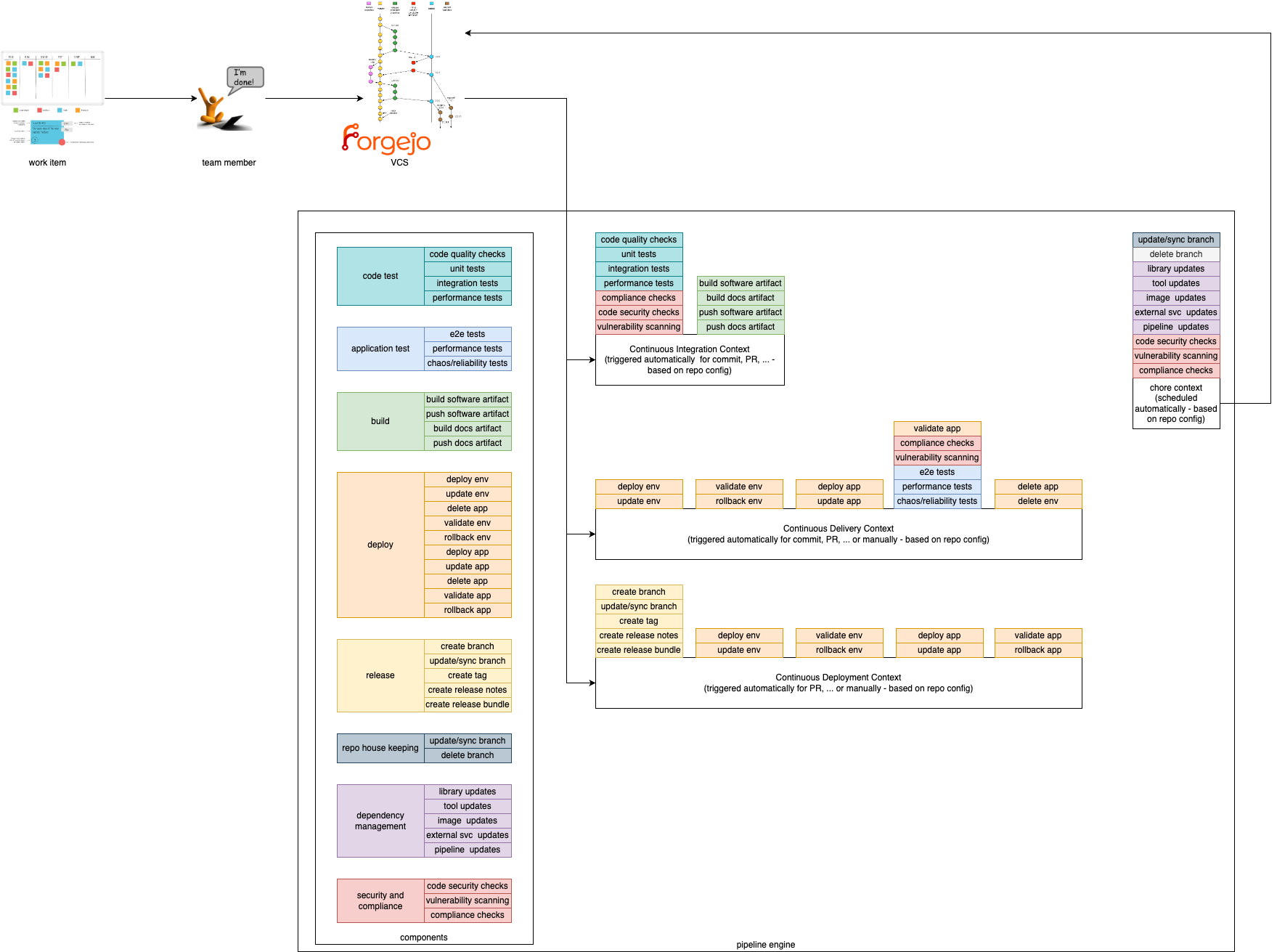
In order to provide a composable pipeline as part of the Edge Developer Framework (EDF), we have defined a set of concepts that can be used to create pipelines for different usage scenarios. These concepts are:
Pipeline Contexts define the context in which a pipeline execution is run. Typically, a context corresponds to a specific step within the software development lifecycle, such as building and testing code, deploying and testing code in staging environments, or releasing code. Contexts define which components are used, in which order, and the environment in which they are executed.
Components are the building blocks, which are used in the pipeline. They define specific steps that are executed in a pipeline such as compiling code, running tests, or deploying an application.
Pipeline Contexts
We provide 4 Pipeline Contexts that can be used to create pipelines for different usage scenarios. The contexts can be described as the golden path, which is fully configurable and extenable by the users.
Pipeline runs with a given context can be triggered by different actions. For example, a pipeline run with the Continuous Integration context can be triggered by a commit to a repository, while a pipeline run with the Continuous Delivery context could be triggered by merging a pull request to a specific branch.
Continuous Integration
This context is focused on running tests and checks on every commit to a repository. It is used to ensure that the codebase is always in a working state and that new changes do not break existing functionality. Tests within this context are typically fast and lightweight, and are used to catch simple errors such as syntax errors, typos, and basic logic errors. Static vulnerability and compliance checks can also be performed in this context.
Continuous Delivery
This context is focused on deploying code to a (ephermal) staging environment after its static checks have been performed. It is used to ensure that the codebase is always deployable and that new changes can be easily reviewed by stakeholders. Tests within this context are typically more comprehensive than those in the Continuous Integration context, and handle more complex scenarios such as integration tests and end-to-end tests. Additionally, live security and compliance checks can be performed in this context.
Continuous Deployment
This context is focused on deploying code to a production environment and/or publishing artefacts after static checks have been performed.
Chore
This context focuses on measures that need to be carried out regularly (e.g. security or compliance scans). They are used to ensure the robustness, security and efficiency of software projects. They enable teams to maintain high standards of quality and reliability while minimizing risks and allowing developers to focus on more critical and creative aspects of development, increasing overall productivity and satisfaction.
Components
Components are the composable and self-contained building blocks for the contexts described above. The aim is to cover most (common) use cases for application teams and make them particularly easy to use by following our golden paths. This way, application teams only have to include and configure the functionalities they actually need. An additional benefit is that this allows for easy extensibility. If a desired functionality has not been implemented as a component, application teams can simply add their own.
Components must be as small as possible and follow the same concepts of software development and deployment as any other software product. In particular, they must have the following characteristics:
- designed for a single task
- provide a clear and intuitive output
- easy to compose
- easily customizable or interchangeable
- automatically testable
In the EDF components are divided into different categories. Each category contains components that perform similar actions. For example, the build category contains components that compile code, while the deploy category contains components that automate the management of the artefacts created in a production-like system.
Note: Components are comparable to interfaces in programming. Each component defines a certain behaviour, but the actual implementation of these actions depends on the specific codebase and environment.
For example, the build component defines the action of compiling code, but the actual build process depends on the programming language and build tools used in the project. The vulnerability scanning component will likely execute different tools and interact with different APIs depending on the context in which it is executed.
Build
Build components are used to compile code. They can be used to compile code written in different programming languages, and can be used to compile code for different platforms.
Code Test
These components define tests that are run on the codebase. They are used to ensure that the codebase is always in a working state and that new changes do not break existing functionality. Tests within this category are typically fast and lightweight, and are used to catch simple errors such as syntax errors, typos, and basic logic errors. Tests must be executable in isolation, and do not require external dependencies such as databases or network connections.
Application Test
Application tests are tests, which run the code in a real execution environment, and provide external dependencies. These tests are typically more comprehensive than those in the Code Test category, and handle more complex scenarios such as integration tests and end-to-end tests.
Deploy
Deploy components are used to deploy code to different environments, but can also be used to publish artifacts. They are typically used in the Continuous Delivery and Continuous Deployment contexts.
Release
Release components are used to create releases of the codebase. They can be used to create tags in the repository, create release notes, or perform other tasks related to releasing code. They are typically used in the Continuous Deployment context.
Repo House Keeping
Repo house keeping components are used to manage the repository. They can be used to clean up old branches, update the repository’s README file, or perform other maintenance tasks. They can also be used to handle issues, such as automatically closing stale issues.
Dependency Management
Dependency management is used to automate the process of managing dependencies in a codebase. It can be used to create pull requests with updated dependencies, or to automatically update dependencies in a codebase.
Security and Compliance
Security and compliance components are used to ensure that the codebase meets security and compliance requirements. They can be used to scan the codebase for vulnerabilities, check for compliance with coding standards, or perform other security and compliance checks. Depending on the context, different tools can be used to accomplish scanning. In the Continuous Integration context, static code analysis can be used to scan the codebase for vulnerabilities, while in the Continuous Delivery context, live security and compliance checks can be performed.
1.1 -
Gitops changes the definition of ‘Delivery’ or ‘Deployment’
We have Gitops these days …. so there is a desired state of an environment in a repo and a reconciling mechanism done by Gitops to enforce this state on the environemnt.
There is no continuous whatever step inbetween … Gitops is just ‘overwriting’ (to avoid saying ‘delivering’ or ‘deploying’) the environment with the new state.
This means whatever quality ensuring steps have to take part before ‘overwriting’ have to be defined as state changer in the repos, not in the environments.
Conclusio: I think we only have three contexts, or let’s say we don’t have the contect ‘continuous delivery’