This is the multi-page printable view of this section. Click here to print.
Concepts
- 1: Code: Software and Workloads
- 2: Engineers
- 3: Use Cases
- 4: (Digital) Platforms
- 4.1: Platform Engineering
- 4.1.1: Reference Architecture
- 4.2: Platform Components
- 4.2.1: CI/CD Pipeline
- 4.2.2: Developer Portals
- 4.2.3: Platform Orchestrator
- 4.2.4: List of references
- 5: Platform Orchestrators
1 - Code: Software and Workloads
2 - Engineers
3 - Use Cases
Rationale
The challenge of IPCEI-CIS Developer Framework is to provide value for DTAG customers, and more specifically: for Developers of DTAG customers.
That’s why we need verifications - or test use cases - for the Developer Framework to develop.
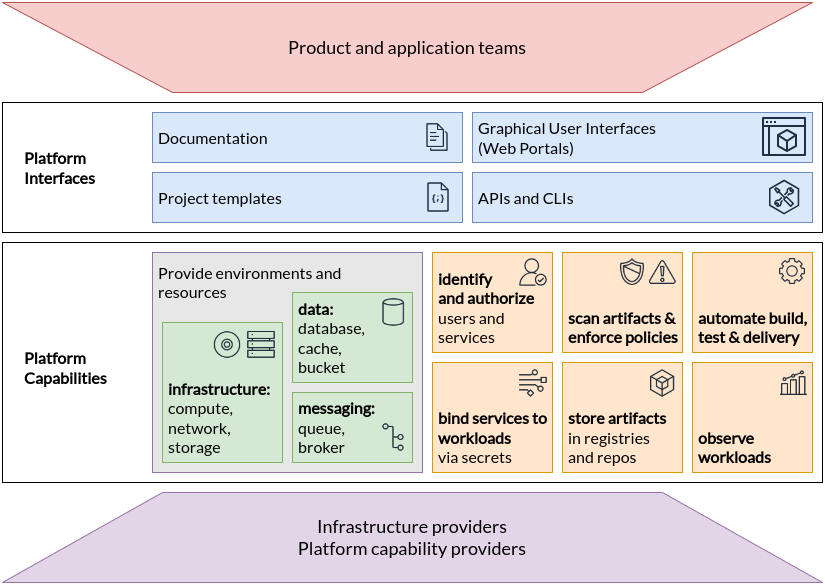 (source: https://tag-app-delivery.cncf.io/whitepapers/platforms/)
Golden Paths as Use Cases
- https://platformengineering.org/blog/how-to-pave-golden-paths-that-actually-go-somewhere
- https://thenewstack.io/using-an-internal-developer-portal-for-golden-paths/
- https://nl.devoteam.com/expert-view/building-golden-paths-with-internal-developer-platforms/
- https://www.redhat.com/en/blog/designing-golden-paths
List of Use Cases
Here we have a collection of possible usage scenarios.
Socksshop
Deploy and develop the famous socks shops:
See also mkdev fork: https://github.com/mkdev-me/microservices-demo
Humanitec Demos
Github Examples
Telemetry Use Case with respect to the Fibonacci workload
The Fibonacci App on the cluster can be accessed on the path https://cnoe.localtest.me/fibonacci. It can be called for example by using the URL https://cnoe.localtest.me/fibonacci?number=5000000.
The resulting ressource spike can be observed one the Grafana dashboard “Kubernetes / Compute Resources / Cluster”. The resulting visualization should look similar like this:

When and how to use the developer framework?
e.g. an example
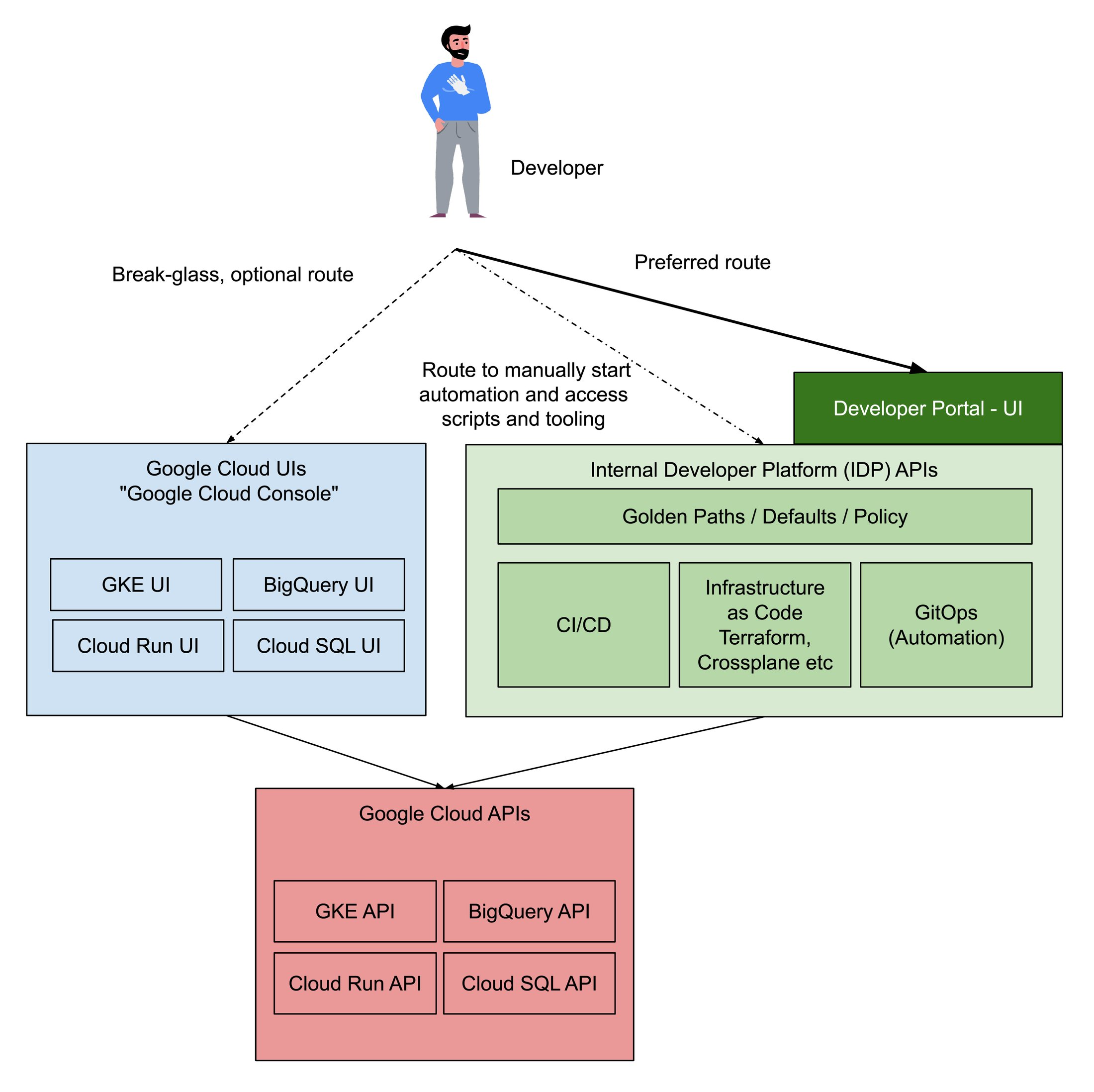
…. taken from https://cloud.google.com/blog/products/application-development/common-myths-about-platform-engineering?hl=en
4 - (Digital) Platforms
Surveys
4.1 - Platform Engineering
Rationale
IPCEI-CIS Developer Framework is part of a cloud native technology stack. To design the capabilities and architecture of the Developer Framework we need to define the surounding context and internal building blocks, both aligned with cutting edge cloud native methodologies and research results.
In CNCF the discipline of building stacks to enhance the developer experience is called ‘Platform Engineering’
CNCF Platforms White Paper
CNCF first asks why we need platform engineering:
The desire to refocus delivery teams on their core focus and reduce duplication of effort across the organisation has motivated enterprises to implement platforms for cloud-native computing. By investing in platforms, enterprises can:
- Reduce the cognitive load on product teams and thereby accelerate product development and delivery
- Improve reliability and resiliency of products relying on platform capabilities by dedicating experts to configure and manage them
- Accelerate product development and delivery by reusing and sharing platform tools and knowledge across many teams in an enterprise
- Reduce risk of security, regulatory and functional issues in products and services by governing platform capabilities and the users, tools and processes surrounding them
- Enable cost-effective and productive use of services from public clouds and other managed offerings by enabling delegation of implementations to those providers while maintaining control over user experience
platformengineering.org’s Definition of Platform Engineering
Platform engineering is the discipline of designing and building toolchains and workflows that enable self-service capabilities for software engineering organizations in the cloud-native era. Platform engineers provide an integrated product most often referred to as an “Internal Developer Platform” covering the operational necessities of the entire lifecycle of an application.
Reference Architecture aka ‘Even more wording’: Internal Developer Platform vs. Developer Portal vs. Platform
https://humanitec.com/blog/wtf-internal-developer-platform-vs-internal-developer-portal-vs-paas
Platform Engineering as running a restaurant
Internal Developer Platform
In IPCEI-CIS right now (July 2024) we are primarily interested in understanding how IDPs are built as one option to implement an IDP is to build it ourselves.
The outcome of the Platform Engineering discipline is - created by the platform engineering team - a so called ‘Internal Developer Platform’.
One of the first sites focusing on this discipline was internaldeveloperplatform.org
Examples of existing IDPs
The amount of available IDPs as product is rapidly growing.
[TODO] LIST OF IDPs
- internaldeveloperplatform.org - ‘Ecosystem’
- Typical market overview: https://medium.com/@rphilogene/10-best-internal-developer-portals-to-consider-in-2023-c780fbf8ab12
- Another one: https://www.qovery.com/blog/10-best-internal-developer-platforms-to-consider-in-2023/
- Just found as another example: platformplane
Additional links
- how-to-fail-at-platform-engineering
- 8-real-world-reasons-to-adopt-platform-engineering
- 7-core-elements-of-an-internal-developer-platform
- internal-developer-platform-vs-internal-developer-portal
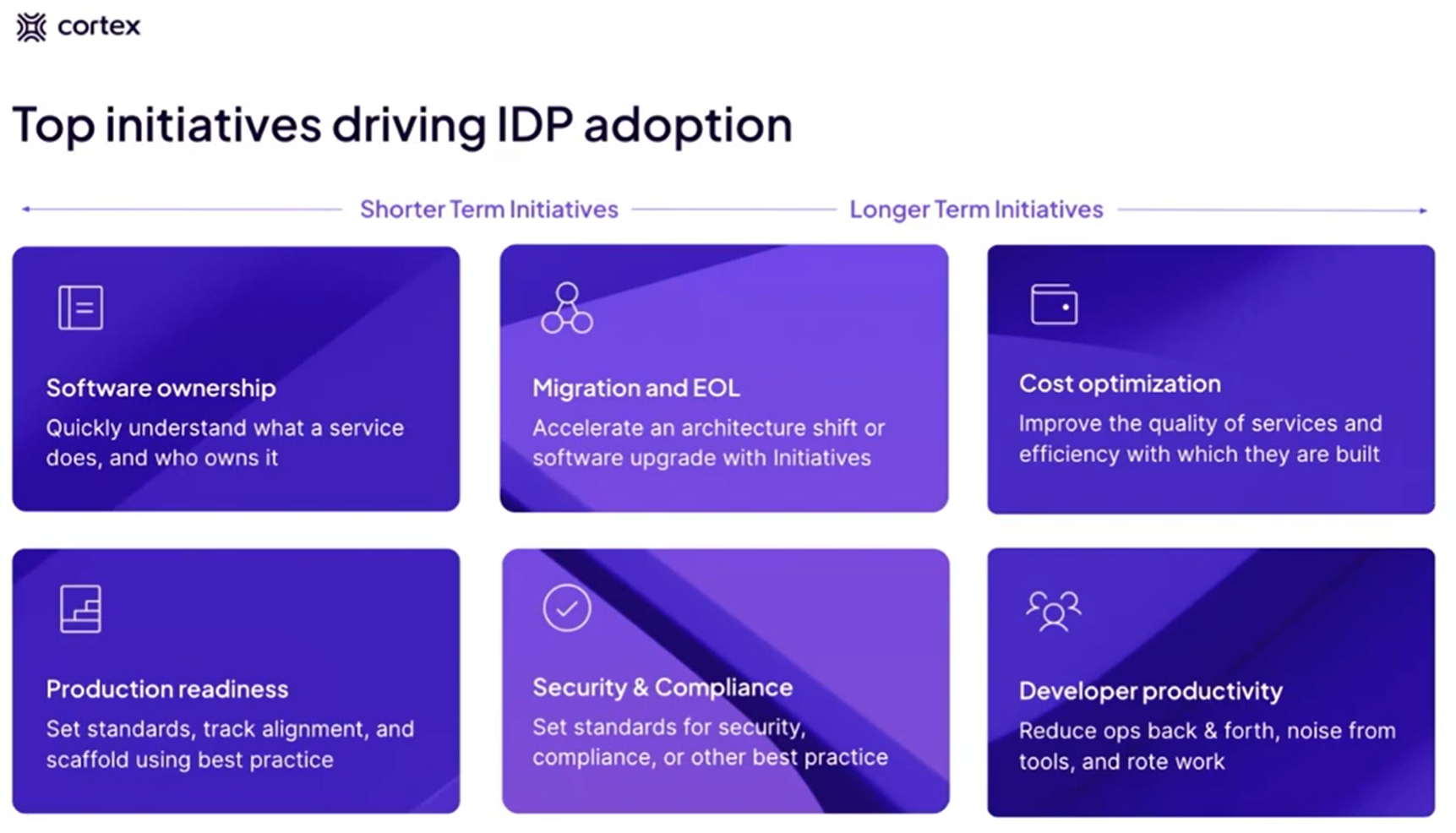
Platform ‘Initiatives’ aka Use Cases
Cortex is talking about Use Cases (aka Initiatives): (or https://www.brighttalk.com/webcast/20257/601901)
4.1.1 - Reference Architecture
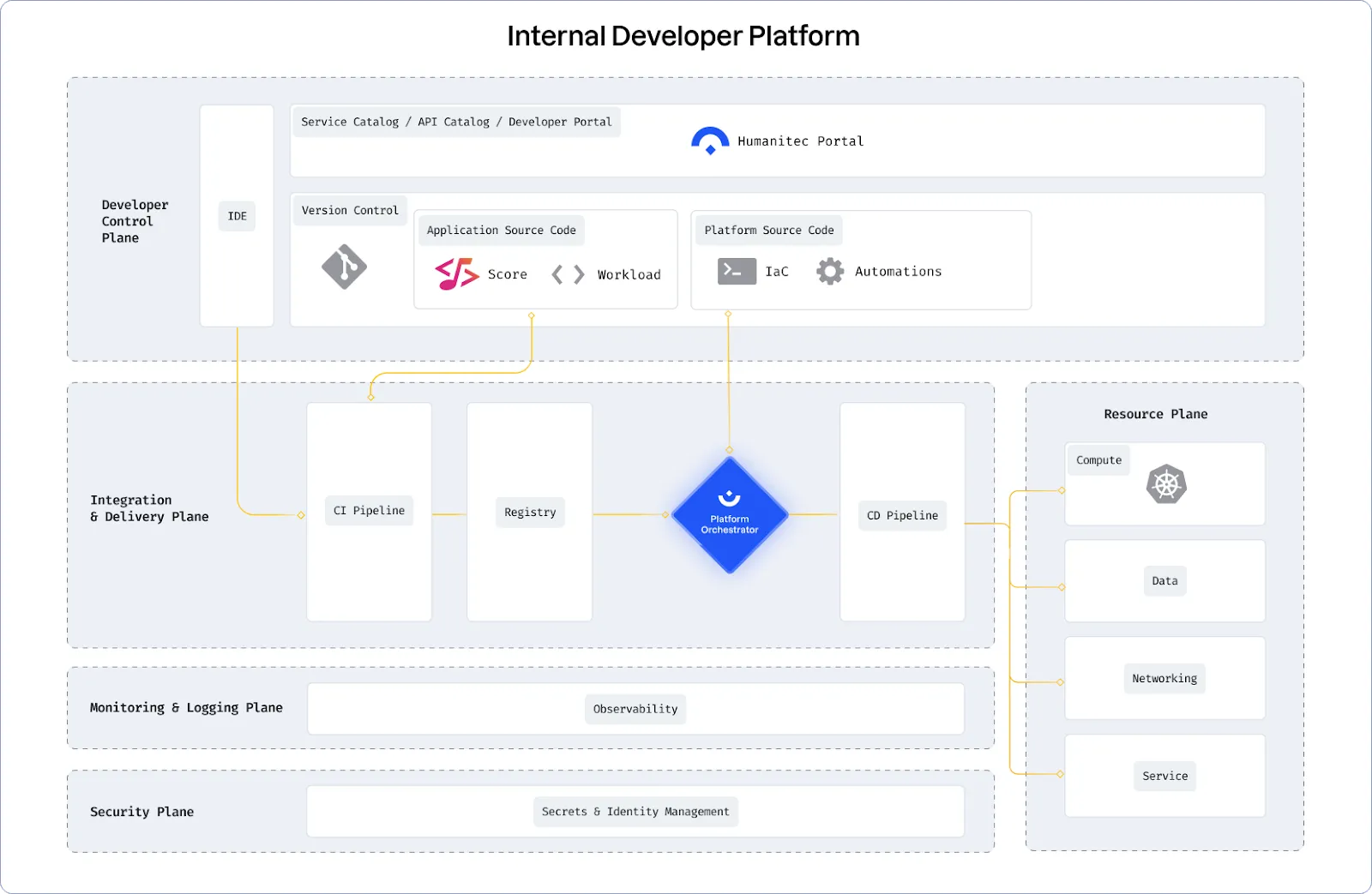
The Structure of a Successful Internal Developer Platform
In a platform reference architecture there are five main planes that make up an IDP:
- Developer Control Plane – this is the primary configuration layer and interaction point for the platform users. Components include Workload specifications such as Score and a portal for developers to interact with.
- Integration and Delivery Plane – this plane is about building and storing the image, creating app and infra configs, and deploying the final state. It usually contains a CI pipeline, an image registry, a Platform Orchestrator, and the CD system.
- Resource Plane – this is where the actual infrastructure exists including clusters, databases, storage or DNS services. 4, Monitoring and Logging Plane – provides real-time metrics and logs for apps and infrastructure.
- Security Plane – manages secrets and identity to protect sensitive information, e.g., storing, managing, and security retrieving API keys and credentials/secrets.

(source: https://humanitec.com/blog/wtf-internal-developer-platform-vs-internal-developer-portal-vs-paas)
Humanitec
https://github.com/humanitec-architecture
https://humanitec.com/reference-architectures
Create a reference architecture
4.2 - Platform Components
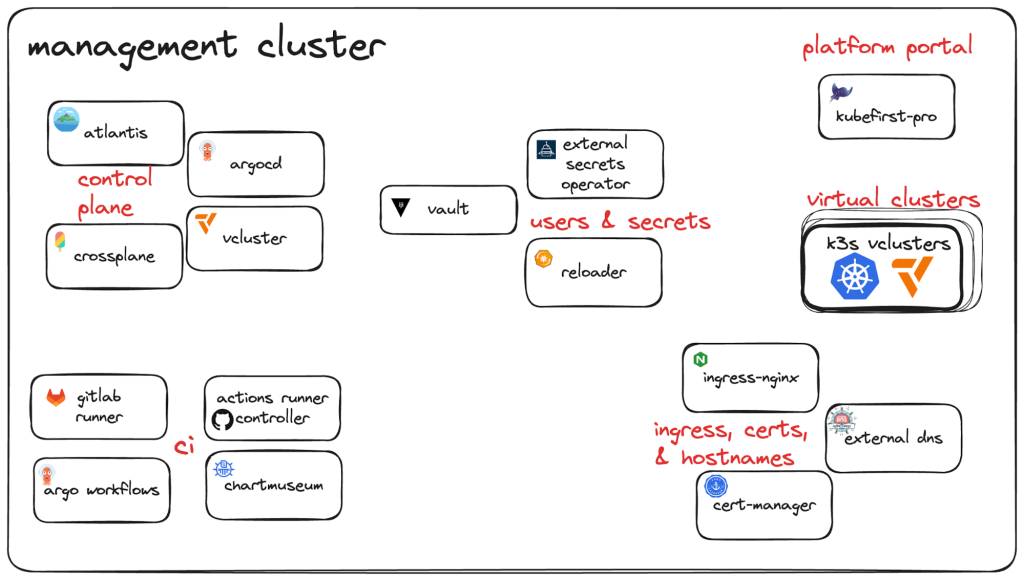
This page is in work. Right now we have in the index a collection of links describing and listing typical components and building blocks of platforms. Also we have a growing number of subsections regarding special types of components.
See also:
- https://thenewstack.io/build-an-open-source-kubernetes-gitops-platform-part-1/
- https://thenewstack.io/build-an-open-source-kubernetes-gitops-platform-part-2/
4.2.1 - CI/CD Pipeline
This document describes the concept of pipelining in the context of the Edge Developer Framework.
Overview
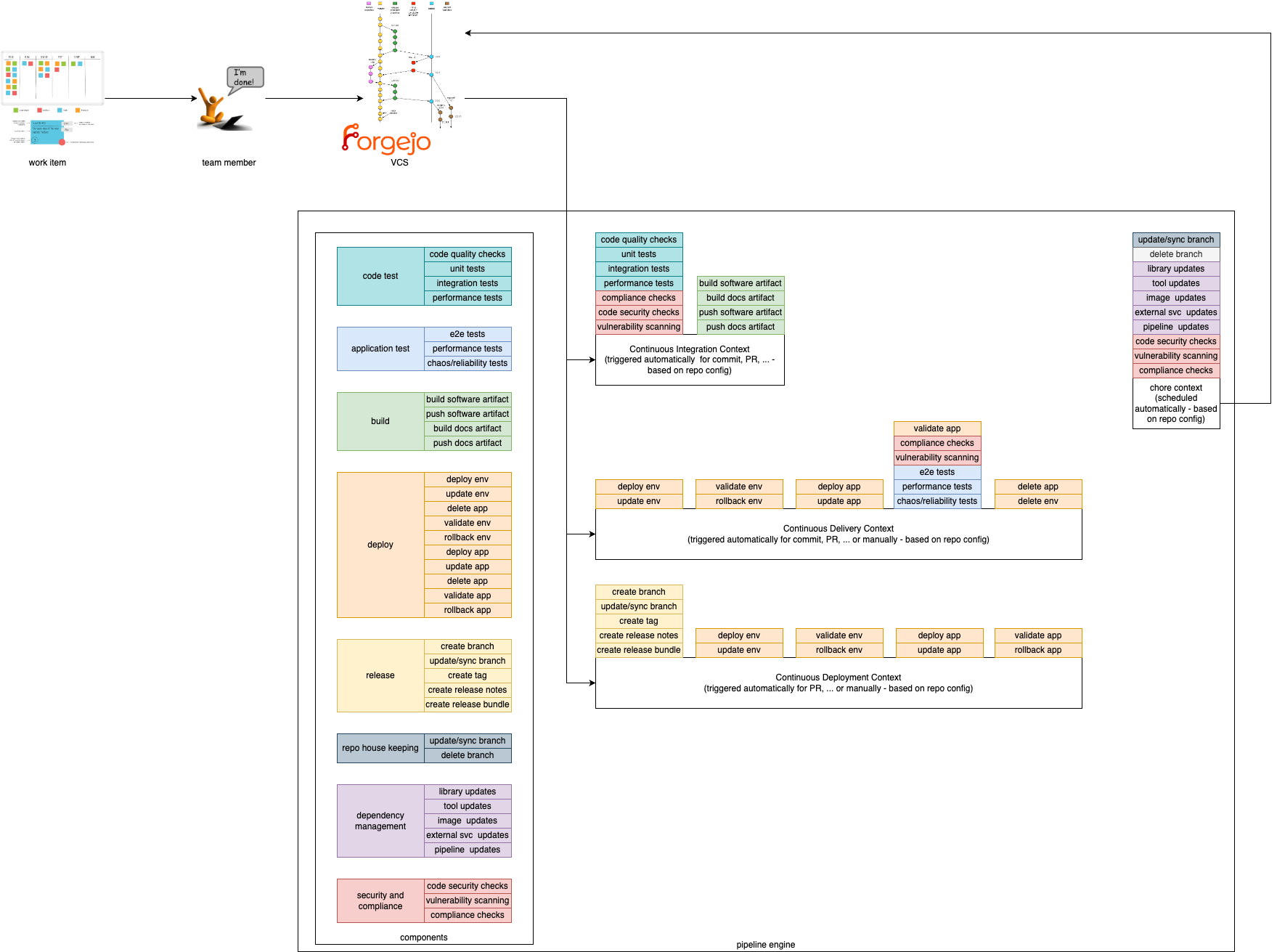
In order to provide a composable pipeline as part of the Edge Developer Framework (EDF), we have defined a set of concepts that can be used to create pipelines for different usage scenarios. These concepts are:
Pipeline Contexts define the context in which a pipeline execution is run. Typically, a context corresponds to a specific step within the software development lifecycle, such as building and testing code, deploying and testing code in staging environments, or releasing code. Contexts define which components are used, in which order, and the environment in which they are executed.
Components are the building blocks, which are used in the pipeline. They define specific steps that are executed in a pipeline such as compiling code, running tests, or deploying an application.
Pipeline Contexts
We provide 4 Pipeline Contexts that can be used to create pipelines for different usage scenarios. The contexts can be described as the golden path, which is fully configurable and extenable by the users.
Pipeline runs with a given context can be triggered by different actions. For example, a pipeline run with the Continuous Integration context can be triggered by a commit to a repository, while a pipeline run with the Continuous Delivery context could be triggered by merging a pull request to a specific branch.
Continuous Integration
This context is focused on running tests and checks on every commit to a repository. It is used to ensure that the codebase is always in a working state and that new changes do not break existing functionality. Tests within this context are typically fast and lightweight, and are used to catch simple errors such as syntax errors, typos, and basic logic errors. Static vulnerability and compliance checks can also be performed in this context.
Continuous Delivery
This context is focused on deploying code to a (ephermal) staging environment after its static checks have been performed. It is used to ensure that the codebase is always deployable and that new changes can be easily reviewed by stakeholders. Tests within this context are typically more comprehensive than those in the Continuous Integration context, and handle more complex scenarios such as integration tests and end-to-end tests. Additionally, live security and compliance checks can be performed in this context.
Continuous Deployment
This context is focused on deploying code to a production environment and/or publishing artefacts after static checks have been performed.
Chore
This context focuses on measures that need to be carried out regularly (e.g. security or compliance scans). They are used to ensure the robustness, security and efficiency of software projects. They enable teams to maintain high standards of quality and reliability while minimizing risks and allowing developers to focus on more critical and creative aspects of development, increasing overall productivity and satisfaction.
Components
Components are the composable and self-contained building blocks for the contexts described above. The aim is to cover most (common) use cases for application teams and make them particularly easy to use by following our golden paths. This way, application teams only have to include and configure the functionalities they actually need. An additional benefit is that this allows for easy extensibility. If a desired functionality has not been implemented as a component, application teams can simply add their own.
Components must be as small as possible and follow the same concepts of software development and deployment as any other software product. In particular, they must have the following characteristics:
- designed for a single task
- provide a clear and intuitive output
- easy to compose
- easily customizable or interchangeable
- automatically testable
In the EDF components are divided into different categories. Each category contains components that perform similar actions. For example, the build category contains components that compile code, while the deploy category contains components that automate the management of the artefacts created in a production-like system.
Note: Components are comparable to interfaces in programming. Each component defines a certain behaviour, but the actual implementation of these actions depends on the specific codebase and environment.
For example, the
buildcomponent defines the action of compiling code, but the actual build process depends on the programming language and build tools used in the project. Thevulnerability scanningcomponent will likely execute different tools and interact with different APIs depending on the context in which it is executed.
Build
Build components are used to compile code. They can be used to compile code written in different programming languages, and can be used to compile code for different platforms.
Code Test
These components define tests that are run on the codebase. They are used to ensure that the codebase is always in a working state and that new changes do not break existing functionality. Tests within this category are typically fast and lightweight, and are used to catch simple errors such as syntax errors, typos, and basic logic errors. Tests must be executable in isolation, and do not require external dependencies such as databases or network connections.
Application Test
Application tests are tests, which run the code in a real execution environment, and provide external dependencies. These tests are typically more comprehensive than those in the Code Test category, and handle more complex scenarios such as integration tests and end-to-end tests.
Deploy
Deploy components are used to deploy code to different environments, but can also be used to publish artifacts. They are typically used in the Continuous Delivery and Continuous Deployment contexts.
Release
Release components are used to create releases of the codebase. They can be used to create tags in the repository, create release notes, or perform other tasks related to releasing code. They are typically used in the Continuous Deployment context.
Repo House Keeping
Repo house keeping components are used to manage the repository. They can be used to clean up old branches, update the repository’s README file, or perform other maintenance tasks. They can also be used to handle issues, such as automatically closing stale issues.
Dependency Management
Dependency management is used to automate the process of managing dependencies in a codebase. It can be used to create pull requests with updated dependencies, or to automatically update dependencies in a codebase.
Security and Compliance
Security and compliance components are used to ensure that the codebase meets security and compliance requirements. They can be used to scan the codebase for vulnerabilities, check for compliance with coding standards, or perform other security and compliance checks. Depending on the context, different tools can be used to accomplish scanning. In the Continuous Integration context, static code analysis can be used to scan the codebase for vulnerabilities, while in the Continuous Delivery context, live security and compliance checks can be performed.
4.2.1.1 -
Gitops changes the definition of ‘Delivery’ or ‘Deployment’
We have Gitops these days …. so there is a desired state of an environment in a repo and a reconciling mechanism done by Gitops to enforce this state on the environemnt.
There is no continuous whatever step inbetween … Gitops is just ‘overwriting’ (to avoid saying ‘delivering’ or ‘deploying’) the environment with the new state.
This means whatever quality ensuring steps have to take part before ‘overwriting’ have to be defined as state changer in the repos, not in the environments.
Conclusio: I think we only have three contexts, or let’s say we don’t have the contect ‘continuous delivery’
4.2.2 - Developer Portals
This page is in work. Right now we have in the index a collection of links describing developer portals.
- Backstage (siehe auch https://nl.devoteam.com/expert-view/project-unox/)
- Port
- Cortex
- Humanitec
- OpsLevel
- https://www.configure8.io/
- … tbc …
Port’s Comparison vs. Backstage
https://www.getport.io/compare/backstage-vs-port
Cortex’s Comparison vs. Backstage, Port, OpsLevel
Service Catalogue
- https://humanitec.com/blog/service-catalogs-and-internal-developer-platforms
- https://dzone.com/articles/the-differences-between-a-service-catalog-internal
Links
4.2.3 - Platform Orchestrator
‘Platform Orchestration’ is first mentionned by Thoughtworks in Sept 2023
Links
- portals-vs-platform-orchestrator
- kratix.io
- https://internaldeveloperplatform.org/platform-orchestrators/
- backstack.dev
CNOE
- cnoe.io
Resources
4.2.4 - List of references
CNCF
Here are capability domains to consider when building platforms for cloud-native computing:
- Web portals for observing and provisioning products and capabilities
- APIs (and CLIs) for automatically provisioning products and capabilities
- “Golden path” templates and docs enabling optimal use of capabilities in products
- Automation for building and testing services and products
- Automation for delivering and verifying services and products
- Development environments such as hosted IDEs and remote connection tools
- Observability for services and products using instrumentation and dashboards, including observation of functionality, performance and costs
- Infrastructure services including compute runtimes, programmable networks, and block and volume storage
- Data services including databases, caches, and object stores
- Messaging and event services including brokers, queues, and event fabrics
- Identity and secret management services such as service and user identity and authorization, certificate and key issuance, and static secret storage
- Security services including static analysis of code and artifacts, runtime analysis, and policy enforcement
- Artifact storage including storage of container image and language-specific packages, custom binaries and libraries, and source code
IDP
An Internal Developer Platform (IDP) should be built to cover 5 Core Components:
| Core Component | Short Description |
|---|---|
| Application Configuration Management | Manage application configuration in a dynamic, scalable and reliable way. |
| Infrastructure Orchestration | Orchestrate your infrastructure in a dynamic and intelligent way depending on the context. |
| Environment Management | Enable developers to create new and fully provisioned environments whenever needed. |
| Deployment Management | Implement a delivery pipeline for Continuous Delivery or even Continuous Deployment (CD). |
| Role-Based Access Control | Manage who can do what in a scalable way. |
5 - Platform Orchestrators
5.1 - CNOE
The goal for the CNOE framework is to bring together a cohort of enterprises operating at the same scale so that they can navigate their operational technology decisions together, de-risk their tooling bets, coordinate contribution, and offer guidance to large enterprises on which CNCF technologies to use together to achieve the best cloud efficiencies.
Aussprache
- Englisch Kuh.noo,
- also ‘Kanu’ im Deutschen
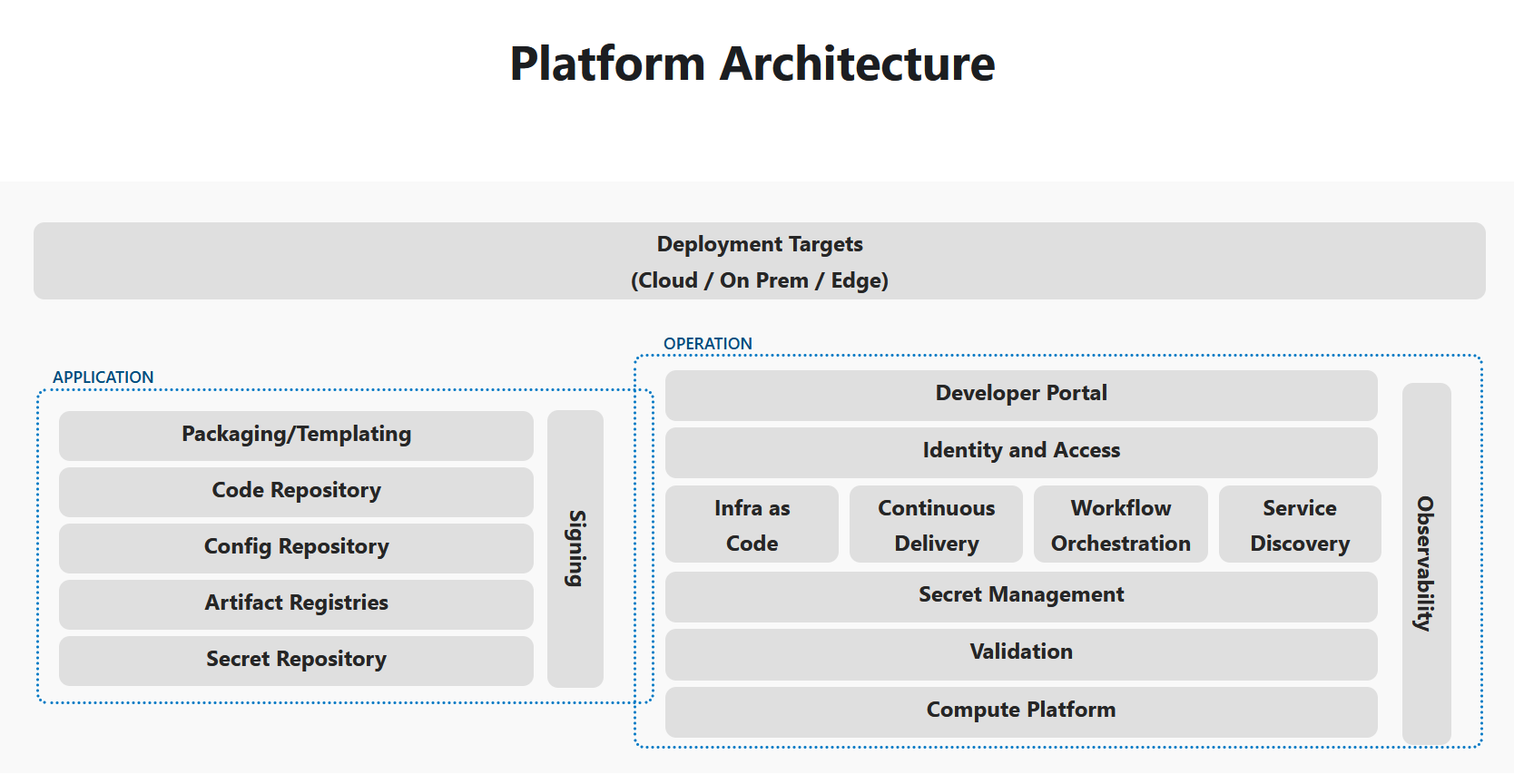
Architecture
Run the CNOEs reference implementation
See https://cnoe.io/docs/reference-implementation/integrations/reference-impl:
# in a local terminal with docker and kind
idpbuilder create --use-path-routing  --log-level debug --package-dir https://github.com/cnoe-io/stacks//ref-implementation
Output
time=2024-08-05T14:48:33.348+02:00 level=INFO msg="Creating kind cluster" logger=setup
time=2024-08-05T14:48:33.371+02:00 level=INFO msg="Runtime detected" logger=setup provider=docker
########################### Our kind config ############################
# Kind kubernetes release images https://github.com/kubernetes-sigs/kind/releases
kind: Cluster
apiVersion: kind.x-k8s.io/v1alpha4
nodes:
- role: control-plane
  image: "kindest/node:v1.29.2"
  kubeadmConfigPatches:
  - |
    kind: InitConfiguration
    nodeRegistration:
      kubeletExtraArgs:
        node-labels: "ingress-ready=true"
  extraPortMappings:
  - containerPort: 443
    hostPort: 8443
    protocol: TCP

containerdConfigPatches:
- |-
  [plugins."io.containerd.grpc.v1.cri".registry.mirrors."gitea.cnoe.localtest.me:8443"]
    endpoint = ["https://gitea.cnoe.localtest.me"]
  [plugins."io.containerd.grpc.v1.cri".registry.configs."gitea.cnoe.localtest.me".tls]
    insecure_skip_verify = true

#########################   config end    ############################
time=2024-08-05T14:48:33.394+02:00 level=INFO msg="Creating kind cluster" logger=setup cluster=localdev
time=2024-08-05T14:48:53.680+02:00 level=INFO msg="Done creating cluster" logger=setup cluster=localdev
time=2024-08-05T14:48:53.905+02:00 level=DEBUG+3 msg="Getting Kube config" logger=setup
time=2024-08-05T14:48:53.908+02:00 level=DEBUG+3 msg="Getting Kube client" logger=setup
time=2024-08-05T14:48:53.908+02:00 level=INFO msg="Adding CRDs to the cluster" logger=setup
time=2024-08-05T14:48:53.948+02:00 level=DEBUG+3 msg="crd not yet established, waiting." "crd name"=custompackages.idpbuilder.cnoe.io
time=2024-08-05T14:48:53.954+02:00 level=DEBUG+3 msg="crd not yet established, waiting." "crd name"=custompackages.idpbuilder.cnoe.io
time=2024-08-05T14:48:53.957+02:00 level=DEBUG+3 msg="crd not yet established, waiting." "crd name"=custompackages.idpbuilder.cnoe.io
time=2024-08-05T14:48:53.981+02:00 level=DEBUG+3 msg="crd not yet established, waiting." "crd name"=gitrepositories.idpbuilder.cnoe.io
time=2024-08-05T14:48:53.985+02:00 level=DEBUG+3 msg="crd not yet established, waiting." "crd name"=gitrepositories.idpbuilder.cnoe.io
time=2024-08-05T14:48:54.734+02:00 level=DEBUG+3 msg="Creating controller manager" logger=setup
time=2024-08-05T14:48:54.737+02:00 level=DEBUG+3 msg="Created temp directory for cloning repositories" logger=setup dir=/tmp/idpbuilder-localdev-2865684949
time=2024-08-05T14:48:54.737+02:00 level=INFO msg="Setting up CoreDNS" logger=setup
time=2024-08-05T14:48:54.798+02:00 level=INFO msg="Setting up TLS certificate" logger=setup
time=2024-08-05T14:48:54.811+02:00 level=DEBUG+3 msg="Creating/getting certificate" logger=setup host=cnoe.localtest.me sans="[cnoe.localtest.me *.cnoe.localtest.me]"
time=2024-08-05T14:48:54.825+02:00 level=DEBUG+3 msg="Creating secret for certificate" logger=setup host=cnoe.localtest.me
time=2024-08-05T14:48:54.832+02:00 level=DEBUG+3 msg="Running controllers" logger=setup
time=2024-08-05T14:48:54.833+02:00 level=DEBUG+3 msg="starting manager"
time=2024-08-05T14:48:54.833+02:00 level=INFO msg="Creating localbuild resource" logger=setup
time=2024-08-05T14:48:54.834+02:00 level=INFO msg="Starting EventSource" controller=custompackage controllerGroup=idpbuilder.cnoe.io controllerKind=CustomPackage source="kind source: *v1alpha1.CustomPackage"
time=2024-08-05T14:48:54.834+02:00 level=INFO msg="Starting EventSource" controller=gitrepository controllerGroup=idpbuilder.cnoe.io controllerKind=GitRepository source="kind source: *v1alpha1.GitRepository"
time=2024-08-05T14:48:54.834+02:00 level=INFO msg="Starting Controller" controller=custompackage controllerGroup=idpbuilder.cnoe.io controllerKind=CustomPackage
time=2024-08-05T14:48:54.834+02:00 level=INFO msg="Starting Controller" controller=gitrepository controllerGroup=idpbuilder.cnoe.io controllerKind=GitRepository
time=2024-08-05T14:48:54.834+02:00 level=INFO msg="Starting EventSource" controller=localbuild controllerGroup=idpbuilder.cnoe.io controllerKind=Localbuild source="kind source: *v1alpha1.Localbuild"
time=2024-08-05T14:48:54.834+02:00 level=INFO msg="Starting Controller" controller=localbuild controllerGroup=idpbuilder.cnoe.io controllerKind=Localbuild
time=2024-08-05T14:48:54.937+02:00 level=INFO msg="Starting workers" controller=gitrepository controllerGroup=idpbuilder.cnoe.io controllerKind=GitRepository "worker count"=1
time=2024-08-05T14:48:54.937+02:00 level=INFO msg="Starting workers" controller=custompackage controllerGroup=idpbuilder.cnoe.io controllerKind=CustomPackage "worker count"=1
time=2024-08-05T14:48:54.937+02:00 level=INFO msg="Starting workers" controller=localbuild controllerGroup=idpbuilder.cnoe.io controllerKind=Localbuild "worker count"=1
time=2024-08-05T14:48:56.863+02:00 level=DEBUG+3 msg=Reconciling controller=localbuild controllerGroup=idpbuilder.cnoe.io controllerKind=Localbuild Localbuild.name=localdev namespace="" name=localdev reconcileID=cc0e5b9d-4952-4fd1-9d62-6d9821f180be resource=/localdev
time=2024-08-05T14:48:56.863+02:00 level=DEBUG+3 msg="Create or update namespace" controller=localbuild controllerGroup=idpbuilder.cnoe.io controllerKind=Localbuild Localbuild.name=localdev namespace="" name=localdev reconcileID=cc0e5b9d-4952-4fd1-9d62-6d9821f180be resource="&Namespace{ObjectMeta:{idpbuilder-localdev      0 0001-01-01 00:00:00 +0000 UTC <nil> <nil> map[] map[] [] [] []},Spec:NamespaceSpec{Finalizers:[],},Status:NamespaceStatus{Phase:,Conditions:[]NamespaceCondition{},},}"
time=2024-08-05T14:48:56.983+02:00 level=DEBUG+3 msg="installing core packages" controller=localbuild controllerGroup=idpbuilder.cnoe.io controllerKind=Localbuild Localbuild.name=localdev namespace="" name=localdev reconcileID=cc0e5b9d-4952-4fd1-9d62-6d9821f180be
time=2024-08-05T14:

...

time=2024-08-05T14:51:04.166+02:00 level=INFO msg="Stopping and waiting for webhooks"
time=2024-08-05T14:51:04.166+02:00 level=INFO msg="Stopping and waiting for HTTP servers"
time=2024-08-05T14:51:04.166+02:00 level=INFO msg="Wait completed, proceeding to shutdown the manager"

########################### Finished Creating IDP Successfully! ############################


Can Access ArgoCD at https://cnoe.localtest.me:8443/argocd
Username: admin
Password can be retrieved by running: idpbuilder get secrets -p argocd
Outcome
Nach ca. 10 minuten sind alle applications ausgerollt (am längsten dauert Backstage):
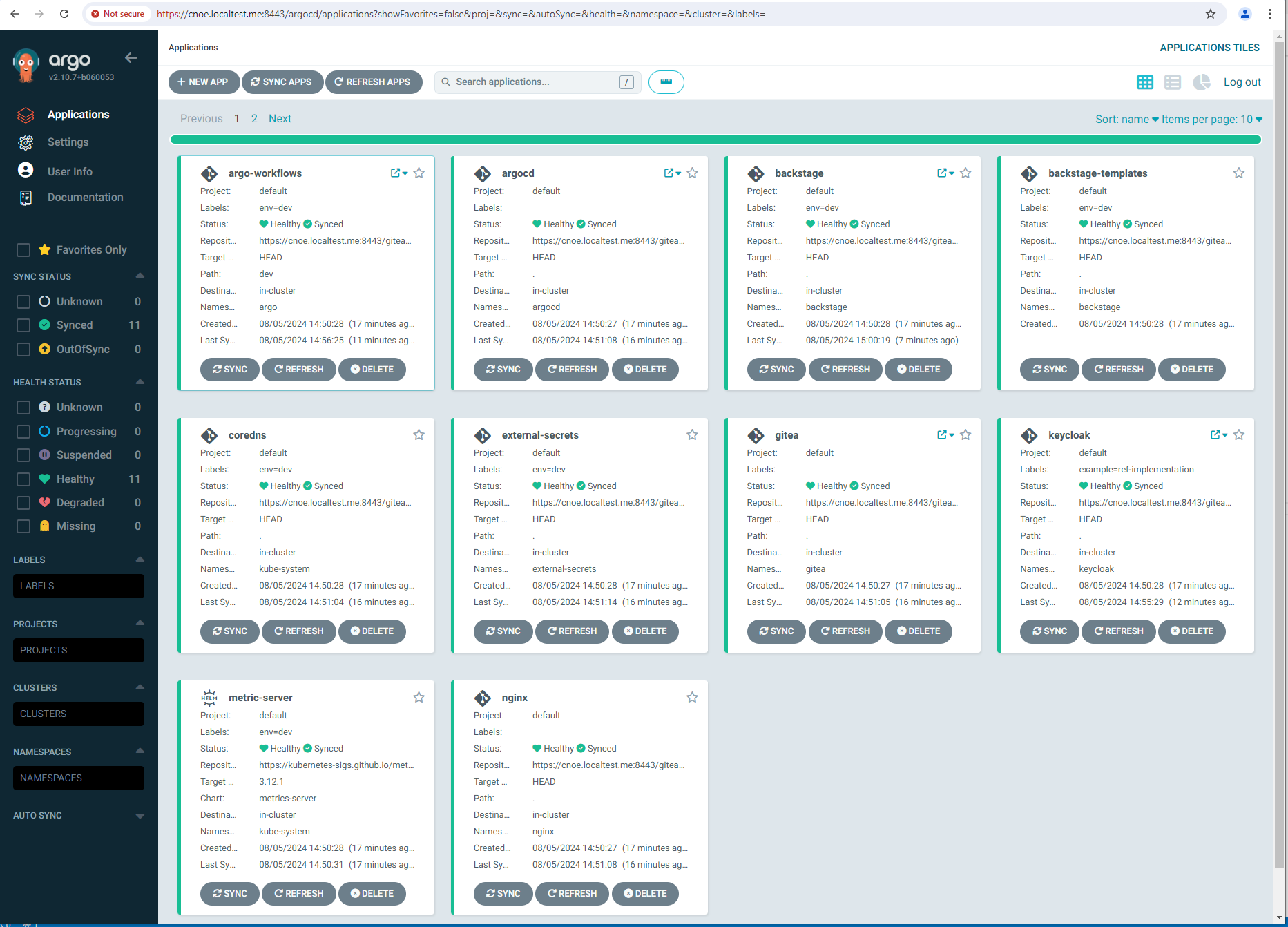
stl@ubuntu-vpn:~$ kubectl get applications -A
NAMESPACE   NAME                  SYNC STATUS   HEALTH STATUS
argocd      argo-workflows        Synced        Healthy
argocd      argocd                Synced        Healthy
argocd      backstage             Synced        Healthy
argocd      included-backstage-templates   Synced        Healthy
argocd      coredns               Synced        Healthy
argocd      external-secrets      Synced        Healthy
argocd      gitea                 Synced        Healthy
argocd      keycloak              Synced        Healthy
argocd      metric-server         Synced        Healthy
argocd      nginx                 Synced        Healthy
argocd      spark-operator        Synced        Healthy
stl@ubuntu-vpn:~$ idpbuilder get secrets
---------------------------
Name: argocd-initial-admin-secret
Namespace: argocd
Data:
  password : sPMdWiy0y0jhhveW
  username : admin
---------------------------
Name: gitea-credential
Namespace: gitea
Data:
  password : |iJ+8gG,(Jj?cc*G>%(i'OA7@(9ya3xTNLB{9k'G
  username : giteaAdmin
---------------------------
Name: keycloak-config
Namespace: keycloak
Data:
  KC_DB_PASSWORD : ES-rOE6MXs09r+fAdXJOvaZJ5I-+nZ+hj7zF
  KC_DB_USERNAME : keycloak
  KEYCLOAK_ADMIN_PASSWORD : BBeMUUK1CdmhKWxZxDDa1c5A+/Z-dE/7UD4/
  POSTGRES_DB : keycloak
  POSTGRES_PASSWORD : ES-rOE6MXs09r+fAdXJOvaZJ5I-+nZ+hj7zF
  POSTGRES_USER : keycloak
  USER_PASSWORD : RwCHPvPVMu+fQM4L6W/q-Wq79MMP+3CN-Jeo
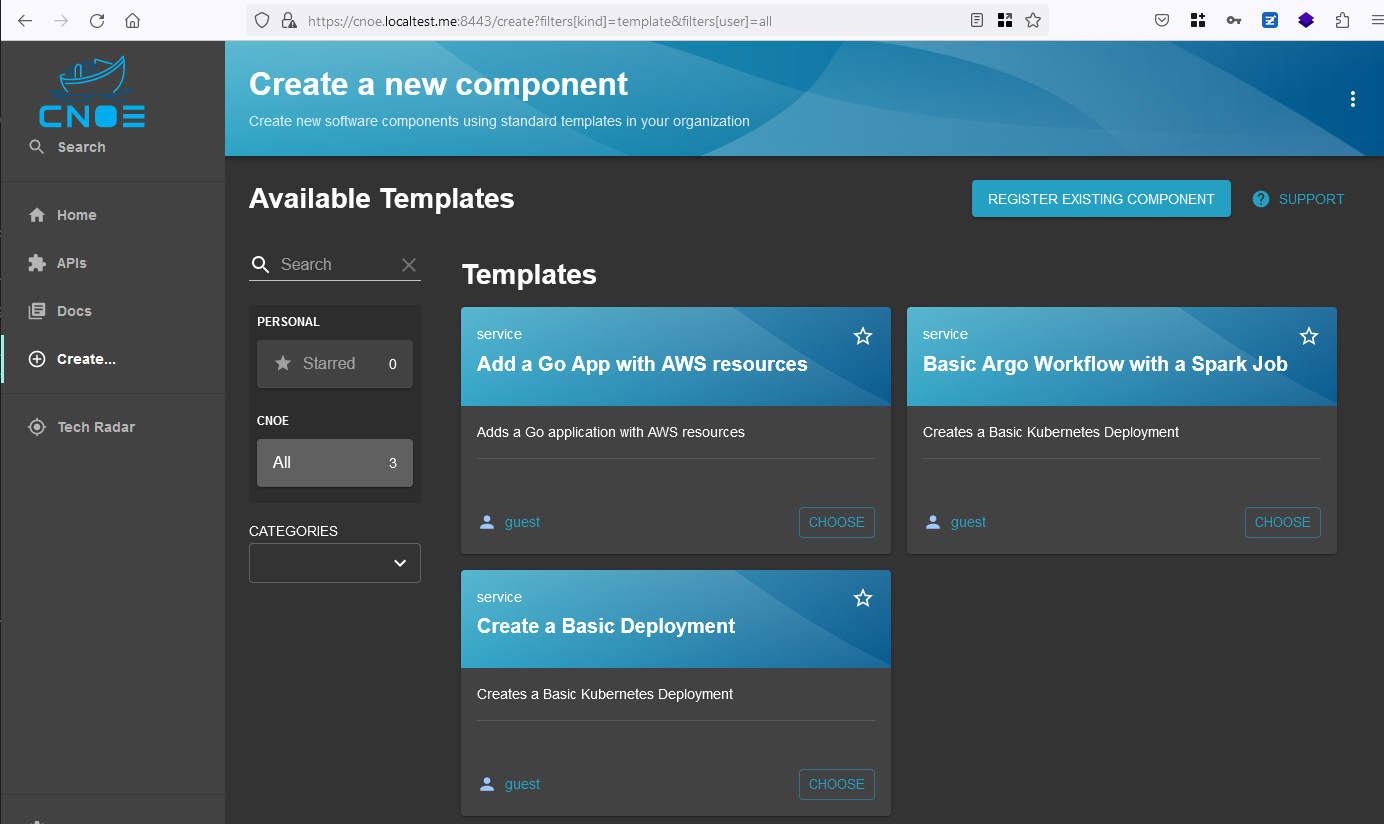
login to backstage
login geht mit den Creds, siehe oben:
5.2 - Humanitec
tbd